
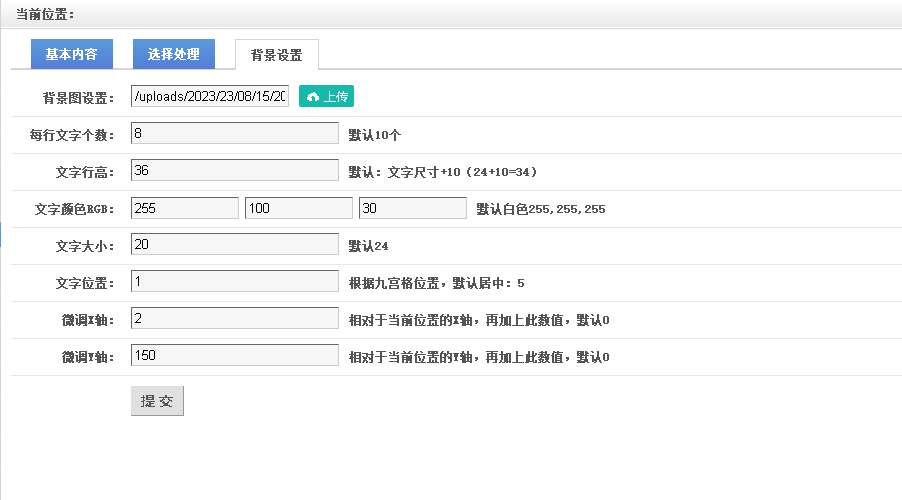
功能描述:
做个图片文字水印,在缩略图中加入文字标题
文字可以设置大小,以及摆放的位置
必须支持中文
开发准备:
支持中文的字体simsun.ttf
 simsun.zip
php开发环境
代码展示:这里仅仅是我项目中的节选关键代码,并非完整的代码,仅作功能逻辑展示
前端表单代码:主要是一些可以设置的参数设定
<form action="?c=imagetitle&run=2" method="post" id="gform"> <div id="infos3" class="none"> <dl style="border:0;"> <dt>背景图设置:</dt> <dd> <input name="bgimage" id="bgimage" type="text" class="int" value="" /> </dd> </dl> <dl > <dt>每行文字个数:</dt> <dd> <input name="text_num" placeholder="填数字" id="text_num" type="number" class="int" value="" style="width:200px;" /> </dd> <dd><strong>默认10个</strong></dd> </dl> <dl > <dt>文字行高:</dt> <dd> <input name="text_h" placeholder="填数字" id="text_h" type="number" class="int" value="" style="width:200px;" /> </dd> <dd><strong>默认:文字尺寸+10(24+10=34)</strong></dd> </dl> <dl > <dt>文字颜色RGB:</dt> <dd> <input name="text_rgb1" placeholder="填R" id="text_rgb1" type="text" class="int" value="" style="width:100px;" /> <input name="text_rgb2" placeholder="填G" id="text_rgb2" type="text" class="int" value="" style="width:100px;" /> <input name="text_rgb3" placeholder="填B" id="text_rgb3" type="text" class="int" value="" style="width:100px;" /> </dd> <dd><strong>默认白色255,255,255</strong></dd> </dl> <dl > <dt>文字大小:</dt> <dd> <input name="text_size" placeholder="填数字" id="text_size" type="number" class="int" value="" style="width:200px;" /> </dd> <dd><strong>默认24</strong></dd> </dl> <dl > <dt>文字位置:</dt> <dd> <input name="text_wz" placeholder="填数字" id="text_wz" type="number" class="int" value="" style="width:200px;" /> </dd> <dd><strong>根据九宫格位置,默认居中:5</strong></dd> </dl> <dl > <dt>微调X轴:</dt> <dd> <input name="text_x" placeholder="填数字" id="text_x" type="text" class="int" value="" style="width:200px;" /> </dd> <dd><strong>相对于当前位置的X轴,再加上此数值,默认0</strong></dd> </dl> <dl > <dt>微调Y轴:</dt> <dd> <input name="text_y" placeholder="填数字" id="text_y" type="text" class="int" value="" style="width:200px;" /> </dd> <dd><strong>相对于当前位置的Y轴,再加上此数值,默认0</strong></dd> </dl> <dl> <dt> </dt> <dd> <input type="submit" id="submit" value="提 交" class="btnbig" /> </dd> </dl> </div> </form>
后端代码功能:
function image($title,$path){

	// 图片路径
	$imagePath = $path;
	// 文字水印内容
	$text = $title;
	// 每行文字数
	$charsPerLine = syExt('text_num') ?: 10;
	// 文字大小
	$fontSize = syExt('text_size') ?: 24;
	// 文字行高
	$lineHeight = syExt('text_h') ?: 34;
	// 文字间距
	$letterSpacing = 2;
	// 文字颜色(RGB格式)
	$color = [syExt('text_rgb1') ?: 255, syExt('text_rgb2') ?: 255, syExt('text_rgb3') ?: 255];
	// 文字字体路径
	$fontPath = APP_PATH.'/simsun.ttf';
	// 文字水印位置(1-9,左上到右下)
	$position = syExt('text_wz') ?: 5;

	// 创建图像资源
	//$image = imagecreatefromjpeg($imagePath);
	if(stripos($imagePath,'.png')!==false){
		$image = imagecreatefrompng($imagePath);
	}else if(stripos($imagePath,'.gif')!==false){
		$image = imagecreatefromgif($imagePath);
	}else{
		$image = imagecreatefromjpeg($imagePath);
	}
	// 设置字体文件路径 ---高版本已经废弃
	putenv('GDFONTPATH=' . realpath('.'));
	// 设置文字颜色
	$textColor = imagecolorallocate($image, $color[0], $color[1], $color[2]);

	// 获取图像尺寸
	$imageWidth = imagesx($image);
	$imageHeight = imagesy($image);
	//echo $imageWidth.'-'.$imageHeight.'<br>';
	// 计算文字宽度和高度
	$textBoundingBox = imagettfbbox($fontSize, 0, $fontPath, $text);
	$textWidth = $textBoundingBox[2] - $textBoundingBox[0];
	$textHeight = $textBoundingBox[1] - $textBoundingBox[7];
	//echo $textWidth.'-'.$textHeight.'<br>';


	// 处理文字水印内容并自动换行
	$lines = [];
	$line = '';
	//$chars = mb_str_split($text);
	$chars = $this->smb_str_split($text);
	$newlines = [];
	$l = '';
	$n = 1;//行数
	foreach($chars as $k=>$v){
		$l.=$v;
		if( ($k+1)%$charsPerLine==0){
			$newlines[] = $l;
			$l = '';
			$n += 1;
		}
	}
	$newlines[] = $l;
	//var_dump($newlines);exit;
	//计算文字真实和宽度
	$old = $textHeight+2;
	$textHeight = count($newlines) * $old;
	if($n==1){
	$textWidth = $old * count($chars);
	}else{
	$textWidth = $old * $charsPerLine;
	}


	// 计算水印位置
	switch ($position) {
		case 1: // 左上
			$x = 0;
			$y = 0;
			break;
		case 2: // 上
			$x = ($imageWidth - $textWidth) / 2;
			$y = 0;
			break;
		case 3: // 右上
			$x = $imageWidth - $textWidth;
			$y = 0;
			break;
		case 4: // 左
			$x = 0;
			$y = ($imageHeight - $textHeight) / 2;
			break;
		case 5: // 居中
			$x = ($imageWidth - $textWidth) / 2;
			$y = ($imageHeight - $textHeight) / 2;
			break;
		case 6: // 右
			$x = $imageWidth - $textWidth;
			$y = ($imageHeight - $textHeight) / 2;
			break;
		case 7: // 左下
			$x = 0;
			$y = $imageHeight - $textHeight;
			break;
		case 8: // 下
			$x = ($imageWidth - $textWidth) / 2;
			$y = $imageHeight - $textHeight;
			break;
		case 9: // 右下
			$x = $imageWidth - $textWidth;
			$y = $imageHeight - $textHeight;
			break;
		default: // 默认为右下
			$x = $imageWidth - $textWidth;
			$y = $imageHeight - $textHeight;
			break;
	}

	// 添加文字水印
	$y = $y + $fontSize;

	//微调
	$x = $x + syExt('text_x');
	$y = $y + syExt('text_y');

	foreach ($newlines as $line) {
		///echo '('.$x.','.$y.')<br>';
		imagettftext($image, $fontSize, 0, $x, $y, $textColor, $fontPath, $line);
		$y += $lineHeight;


	}
	//var_dump($newlines);

	// 输出图像
	//header('Content-Type: image/jpeg');
	//imagejpeg($image);
	$p = explode('.',$imagePath);
	$pic = end($p);
	// 生成新的图像文件名
	$source = 'uploads/images/'.date('YmdHis').rand(1000,9999).'.'.$pic; // 替换为你想要保存的图像文件路径和文件名
	$newImagePath = $source;

	// 保存图像到文件
	//imagejpeg($image, $newImagePath);
	//imagepng($image, $newImagePath);
	//imagegif($image, $newImagePath);

	if(stripos($imagePath,'.png')!==false){
		imagepng($image, $newImagePath);
	}else if(stripos($imagePath,'.gif')!==false){
		imagegif($image, $newImagePath);
	}else{
		imagejpeg($image, $newImagePath);
	}


	// 释放资源
	imagedestroy($image);

	return '/'.$source;
}


// 将字符串拆分为单个字符
function smb_str_split($string, $split_length = 1, $encoding = null) {
	if ($split_length < 1) {
		return false;
	}
	if ($encoding === null) {
		$encoding = mb_internal_encoding();
	}
	$result = [];
	$length = mb_strlen($string, $encoding);
	for ($i = 0; $i < $length; $i += $split_length) {
		$result[] = mb_substr($string, $i, $split_length, $encoding);
	}
	return $result;
}
注释:这里面的syExt是获取的配置里面的参数值,相信大家能看明白,就不过多解释了。
表单中保存的配置数据,需要自己写方法保存下载,我这里就没有写了。
另外,字体文件放到根目录,能直接访问到比较好。
版权声明:本文发布于与老涂一起写代码 内容均来源于互联网 如有侵权联系删除





快来评论,快来抢沙发吧~